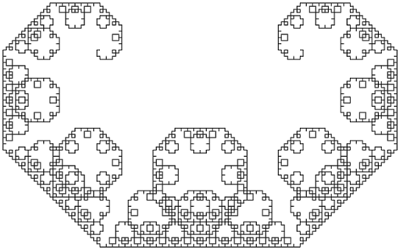
The Lévy C curve in... C
I've been reading about HTML and other web standards lately, and it eventually led me to SVG, a vector image format I've been meaning to look into for some time. By a fortunate coincidence, I had been reading about PostScript just prior to this, and SVG came naturally after that. So I set out to make my first SVG drawing, and after a while I decided on the Lévy C curve.
This:

Think of this line as being directed from A to B. In the next step, instead of going directly to B, we take a detour to point C:

Standing at A, and facing B, we turn right 45° and move 1/√2 times the distance AB to the point C. There, we turn left 45°, twice, and head for B. After reaching B, we turn right 45° once more, so we end up heading the same way we started.
To recap, we were standing at A, and facing B. Earlier, when we headed straight to B, we had an instruction:
That means, go forward. Later, we replaced F with
That means, turn right, go forward, turn left twice, go forward, and finally turn right (all turns are 45°).
Now, apply this substitution:
again to get:
which looks like this:

The new points have been marked D and E. To show one more iteration explicitly, the instruction for drawing the next step is:
which looks like this, where I haven't marked the new points:

Do this ad infinitum, and you've got yourself the Lévy C curve!
The crux of the program is a simple recursive function that takes the current recursion level, and a displacement in the form of two coordinates x and y:
Now, the interesting thing happens when the recursion level is not zero. That means, there's more work to be done. In particular, we calculate the detour point , and draw the two segments recursively. I won't show it here, but it's easy to see that the detour point is . If that makes you frown, because it looks like we're turning left 45°, not turning right, then it's because we are. SVG considers the y-axis pointing down, so insofar as we're turning towards the positive y-axis, we are turning left. I know. Weird.
Don't forget to decrease the level by one when you make the recursive calls:
That's it for today, I think. Thanks a ton for reading, and I hope I'll see you around!
Show code
This:

Preparation: SVG
Let's get right to it. We're gonna make it using the SVG <path> element. The <path> element is made like this:
<!-- draws an equilateral triangle -->
<path d="M 0 0 L 100 0 L 50 86 Z"></path>
The C curve
That's it for SVG. Now a little bit about the C curve itself. We start with a straight line:Think of this line as being directed from A to B. In the next step, instead of going directly to B, we take a detour to point C:
Standing at A, and facing B, we turn right 45° and move 1/√2 times the distance AB to the point C. There, we turn left 45°, twice, and head for B. After reaching B, we turn right 45° once more, so we end up heading the same way we started.
To recap, we were standing at A, and facing B. Earlier, when we headed straight to B, we had an instruction:
F
That means, go forward. Later, we replaced F with
+F--F+
That means, turn right, go forward, turn left twice, go forward, and finally turn right (all turns are 45°).
Now, apply this substitution:
F → +F--F+
again to get:
++F--F+--+F--F++
which looks like this:
The new points have been marked D and E. To show one more iteration explicitly, the instruction for drawing the next step is:
+++F--F+--+F--F++--++F--F+--+F--F+++
which looks like this, where I haven't marked the new points:
Do this ad infinitum, and you've got yourself the Lévy C curve!
Doing the thing in C
Now, if you've been reading this far, you might be thinking to yourself, "Where is the (other) C that the title mentioned?" Well, I'm glad you asked, because that's what we're gonna do now. We're gonna write a program in C to do this drawing for us.The crux of the program is a simple recursive function that takes the current recursion level, and a displacement in the form of two coordinates x and y:
void ccurve(int level, double x, double y) {
  // code goes here
}
void ccurve(int level, double x, double y) {
  if (level < 1) {
    printf("    l %.2lf %.2lf\n", x, y);
  } else {
    // do something here
  }
}
Now, the interesting thing happens when the recursion level is not zero. That means, there's more work to be done. In particular, we calculate the detour point , and draw the two segments recursively. I won't show it here, but it's easy to see that the detour point is . If that makes you frown, because it looks like we're turning left 45°, not turning right, then it's because we are. SVG considers the y-axis pointing down, so insofar as we're turning towards the positive y-axis, we are turning left. I know. Weird.
Don't forget to decrease the level by one when you make the recursive calls:
void ccurve(int level, double x, double y) {
  if (level < 1) {
    printf("    l %.2lf %.2lf\n", x, y);
  } else {
    double xm = (x-y)/2, ym = (x+y)/2;
    ccurve(level-1, xm, ym);
    ccurve(level-1, x-xm, y-ym);
  }
}
That's it for today, I think. Thanks a ton for reading, and I hope I'll see you around!
Show code
Comments
Post a Comment